Article
Do Teachers Get a Discount on Microsoft Office for Mac? (Honest Answer)
The simple answer is no. There is no teacher discount for buying Microsoft Office on a Mac. Not through the Microsoft Education Store, not through a verification form, not through a code your school district can hand you. We confirmed this with Microsoft directly, and their own store assistant ended up agreeing in writing.
The complicated answer is maybe, because many teachers can get Microsoft 365 free through their school. Whether that free version includes the actual Mac desktop apps depends on a licensing decision your district made, certainly without telling you.
Everything in this article is US pricing and US terms; Microsoft’s education offers differ by country. I worked at Microsoft for years, and questions like this often came up from teacher friends every fall. The answer used to be simpler. Here’s where things stand now in 2026, including what Microsoft’s own support systems offer when teachers ask.
Even Microsoft can’t answer this question
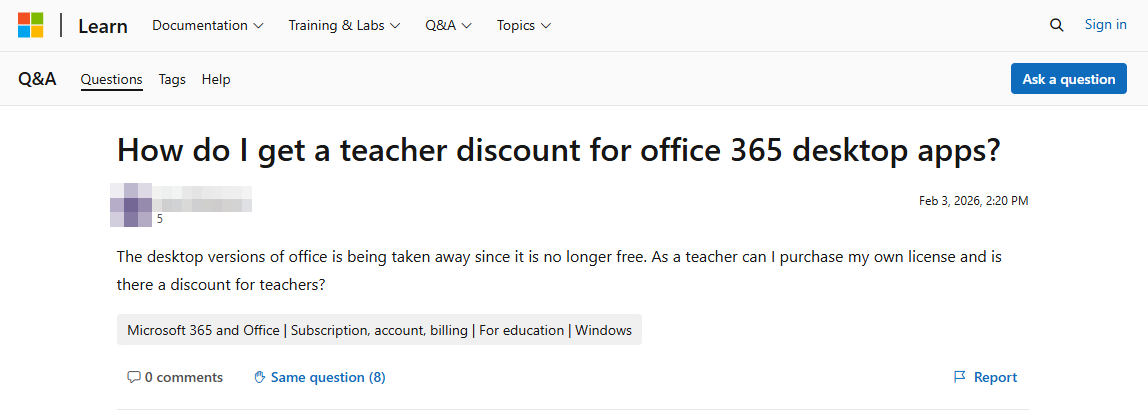
In February 2026, a teacher posted a plain question on Microsoft’s official Q&A forum: her district’s desktop Office apps were going away, and she wanted to buy her own license with her own money. Was there a teacher discount?
Three answers later, she still didn’t have one. The AI response said discounts “may vary by region and program” and told her to contact her Microsoft License Service Provider, which is a volume reseller for organizations, something no individual teacher ever interacts with. A support moderator pointed her to Microsoft Education Store links; she followed them and reported back that she couldn’t find any educator verification or pricing for Office. The reason is they don’t have any. The final suggestion was a “12 free months of Microsoft 365 Premium” promotion. That offer is clearly branded for college students, requires a payment method up front, converts to a paid subscription after the free year, and cancelling means going through both your Microsoft account and your LinkedIn account, because the promotion bundles LinkedIn Premium.
Nobody in the thread ever mentioned that Microsoft sells Office Home 2024 for $179.99, one-time purchase, no subscription, which is the exact thing she asked to buy. Read the thread yourself; as of August 2026 teachers are still adding frustrated comments to it.
So we asked Microsoft ourselves
In August 2026, we put the same question to the AI assistant on Microsoft.com, the company’s own store site: a K-12 teacher with a new MacBook, a school district that provides only the web version of Office, wants the desktop apps. Is there a teacher discount?
The conversation followed the same pattern any teacher who has tried this will recognize. First it recommended two subscriptions, Microsoft 365 Personal and Family, with the one-time purchase mentioned as an afterthought. Asked directly about a discount on Office Home 2024, it admitted there isn’t a separate public teacher price it could quote, then it told us to sign in to the Education Store anyway to check whether reduced pricing appears.
Here’s the problem with that errand. Microsoft publishes the terms of its education discount, and the terms page is specific about what’s covered. Teachers qualify: eligibility includes faculty currently working in education. The discount is up to 10% on select physical products. And the excluded-products list names, as separate line items, “Office software & apps” and “Microsoft 365.”
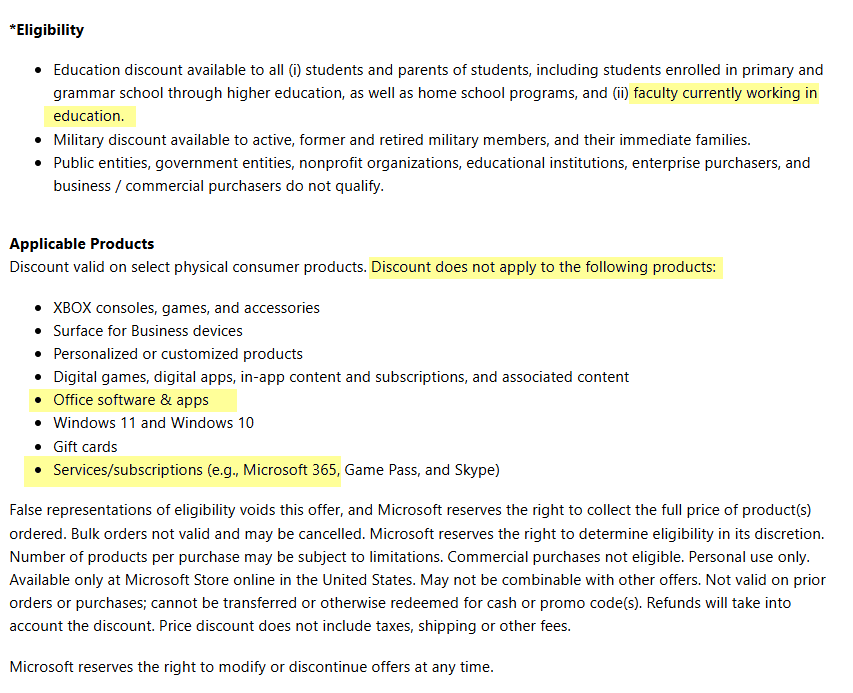
Read that again. Teachers are eligible for Microsoft’s education discount. But Office is excluded from it, by name, in both forms you could buy it. A verified teacher gets 10% off a Surface Pen and nothing off Microsoft Word. That doesn’t seem right.
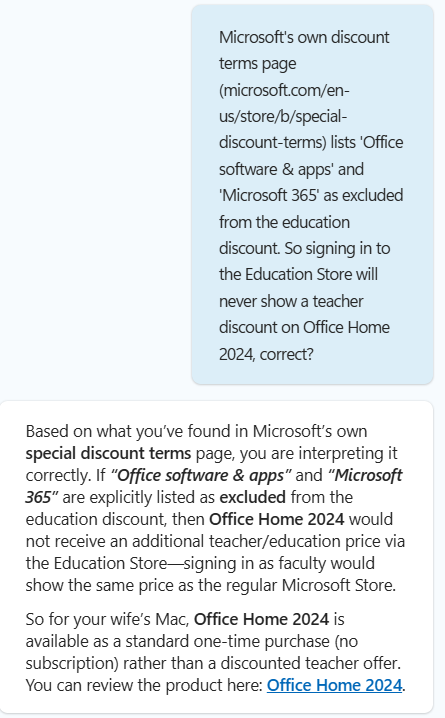
When we pointed the AI assistant to Microsoft’s own terms, it conceded that point: signing in as faculty “would show the same price as the regular Microsoft Store.”
Asked to name any other way teachers can save, it came back with the two things we already knew: the 10% hardware discount and the free school-provided plan. That’s the complete list, from Microsoft’s own website.
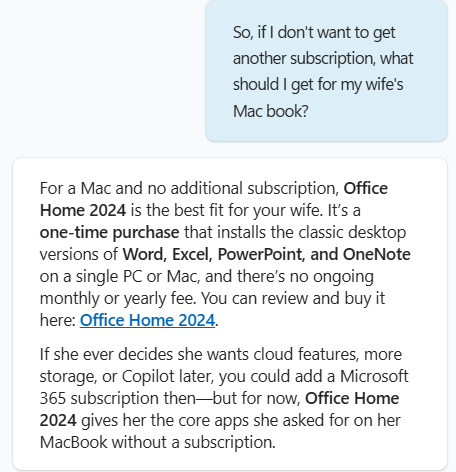
And when we finally asked the question the way a teacher would, no subscription, what should she get, Microsoft’s assistant landed on the same answer this site would have given at the start: Office Home 2024, one-time purchase, no ongoing fee. It took six questions and a citation of their own terms to get there. A maze that wasn’t necessary.
The maze has a simple explanation: the subscription pays Microsoft more. Microsoft 365 Personal costs $99.99 a year; Office Home 2024 costs $179.99 once. By year two the subscriber has paid more, and over the five-or-so-year life of an Office generation it’s roughly $500 against $180. What the extra $320 buys is 1TB of OneDrive, Copilot, and multi-device installs. For the core job, writing in Word and grading in tracked changes, the one-time purchase does the same work. And the flagship difference, the cloud drive, is something most Mac owners already have: every Mac comes with iCloud, and plenty of teachers live in Google Drive through school anyway. Microsoft’s funnel steers you toward the better product for Microsoft, not the better product for you.
What teachers actually get for free
If your school or district subscribes to Microsoft 365 Education, you have some version of Office through your school email right now. The catch is which version, and it comes down to the license tier your district pays for:
- A1 (the free tier): web versions only. Word, Excel, and PowerPoint in a browser. No Mac desktop apps.
- A3 and A5 (paid tiers): everything in A1 plus the full desktop apps, installable on up to five PCs or Macs per user.
Two minutes to check which you have: sign in at office.com with your school email. If you see an “Install apps” button near the top right, your district pays for a tier with desktop apps; click it and you’re done, and you don’t need to buy anything today. If there’s no install option, you’re on web-only A1, and the desktop apps everyone assumes teachers get free are not part of your deal.
One more thing worth knowing about those paid tiers: A3 runs about $3.25 per user per month, billed to institutions through sales partners. A teacher can’t buy it individually at any price. The desktop-app tier costs your district less than $40 a year for you, and if they haven’t bought it, nothing in your own wallet can buy it for you at that rate.
The catch with the free version
School-provided Microsoft 365 belongs to your school, not to you. Four things follow from that:
- Your district can change tiers. A budget decision downgrades A3 to A1, and the desktop apps you built your materials around go away. This is exactly what happened to the teacher in the forum thread above, along with her whole district.
- Your access ends when your employment does. Change districts, retire, or take a year off, and the account closes.
- Your files live in the district’s OneDrive. Lesson plans, worksheets, and templates you made over years sit in storage your employer controls. If the account closes before you copy things out, they’re gone. If you do nothing else after reading this, move personal copies of your materials somewhere you own.
- Some districts block installs on personal devices. The license may include Mac apps your IT policy won’t let you install on your own Mac.
None of this makes the free version a bad deal. It costs nothing and you should absolutely use it. It makes the free version a benefit of your current job rather than something you own, and teaching materials tend to outlast any single job.
Why Office Home 2024 is the right answer for many teachers
If your district is web-only, or you’ve watched a district cut this budget item, or you just want the copy of Word that holds your life’s worth of lesson plans to answer to you and nobody else, buy the license Microsoft’s forum never mentioned and Microsoft’s assistant eventually recommended:
Office Home 2024 is $179.99 once. Word, Excel, PowerPoint, and OneNote on your Mac, supported with security updates through October 9, 2029, no subscription, no renewal, survives every job change you’ll ever make. One honest limitation: the license covers a single computer, so if you work across a personal Mac and a second machine you own, that’s two licenses, or you may need to consider the subscription. Check the current price at Amazon; it dips below list a few times a year, and our deals page tracks verified sales.
Office Home & Business 2024 is $249.99 and adds the Outlook desktop app. Most teachers live in district webmail and don’t need it; pay the extra $70 only if your personal email genuinely runs through desktop Outlook. Current price at Amazon.
Microsoft 365 Personal is $99.99 a year and makes sense in one teacher scenario: you want 1TB of OneDrive as the personal backup home for your materials, you work across several devices, and you’ll actually use the continuous updates. Two years in, you’ve spent more than the one-time license, though. Be sure to read the full comparison in our buyer’s guide.
And the free-year student offer that Microsoft’s forum pointed that teacher toward? If you try it, mark your calendar for month eleven, because it auto-bills after the free year and cancelling takes both your Microsoft and LinkedIn accounts. We cover that trap in the student guide, where the offer at least matches its audience.
The “teacher discounts” you’ll find that aren’t real
Do a Google search on this topic and you will see two kinds of fake savings in the results.
The shopping ads offer Office 2024 “Standard” or “Professional Plus” for $24 to $30. Those product names are the tell: Standard and Professional Plus are volume-licensing editions sold to organizations, not products Microsoft sells to individual consumers. A $25 copy is a resold or misused volume key that works until it’s suddenly deactivated, with no one to call when it is. We broke down how those listings work, and how they end, in the $19 lifetime license article. A teacher’s version of that advice: your materials are too important to run on a license that can vanish mid-semester.
You’re probably already getting ads on Facebook promising up to 50% off Office 365 for teachers, or 90% off Office Home & Business. They describe discounts and redemption steps that do not exist; Microsoft’s own terms, quoted above, exclude Office from the education discount entirely. Any page walking you through a teacher discount checkout for Office is walking you toward a gray-market key with extra steps that may bring you more problems than it’s worth.
Common questions
Is Microsoft Office free for teachers? The web versions are, through any school with Microsoft 365 Education. The Mac desktop apps are free only if your district pays for A3 or A5. Sign in at office.com and look for the Install button; that’s your answer.
Is there an educator discount if I buy Office myself? No. Microsoft’s own discount terms exclude “Office software & apps” and “Microsoft 365” from the education discount, which applies only to select hardware. Teachers qualify for the program; Office isn’t in it.
I’m a homeschool teacher. Do I qualify for anything? For the free school-provided Microsoft 365, generally no; that verification runs on accredited-institution email addresses. For Microsoft’s 10% hardware discount, yes: the terms explicitly include home school programs. For buying Office itself, you pay the same $179.99 as everyone, which is also what every verified public-school teacher pays.
My district only gives us web Office. Is that enough? For email and quick edits, maybe. For the things teachers actually report needing desktop apps for, like heavy formatting in Word and reliable tracked changes when marking up student work, the web versions come up short. That gap is the strongest practical case for the one-time purchase.
Will my school files open in my own copy of Office? Yes. Same file formats. Copy your materials out of the district OneDrive to your own storage first; the file format was never the risk, the account was.
What about Pages and Keynote instead? Fine for materials that stay on your Mac. The friction arrives when you trade files with a district running on .docx and .pptx templates, where conversion quirks cost you formatting. If your whole workflow is district Office files, staying in Office costs less time.
This page contains affiliate links. If you buy through them we may earn a commission at no cost to you, and it doesn’t change our recommendations. You’ll notice the first thing we told you to do is check what your school already gives you for free.